
A carefully drawn weekly plan can collapse the first time a surprise test lands on a supposedly free evening. Homework expands, a group assignment appears, and the student ends up moving every study block forward until exam week becomes a scramble. The problem usually isn't a lack of motivation. It's a timetable that records intentions without creating a rhythm that can survive interruptions.
The best study timetable for students depends on how a student plans. A student juggling JEE or NEET preparation needs different support from someone managing handwritten notes, shared projects, or difficulty staying focused. Indian higher-education students also report very different study patterns across ordinary periods and examination preparation, so one rigid daily target is a poor fit. A 2020 study of 209 students found that 63.64% normally studied for 2–4 hours daily, while attendance and institute time also occupied much of the day (peer-reviewed study of Indian students).
The eight tools below are judged by one practical question: can the tool turn exam dates into a repeatable weekly study rhythm? Each option has a situation where it works well, a setup that makes it useful, and a point where it starts to fall short. Students preparing for a midterm exam study guide can use the comparison before committing to a system.
Table of Contents
- 1. Google Calendar with Study Block Templates
- 2. Notion Study Planner Templates
- 3. Todoist Study Task Manager
- 4. Microsoft OneNote Study Planner
- 5. Trello Board Study Management System
- 6. Evernote Study Notes and Planning System
- 7. Asana Project-Based Study Planner
- 8. Pomofocus and Focus-Based Study Scheduling Apps
- 8-Tool Comparison: Study Timetable Apps & Features
- Choose One Tool and Test It for Two Weeks
1. Google Calendar with Study Block Templates
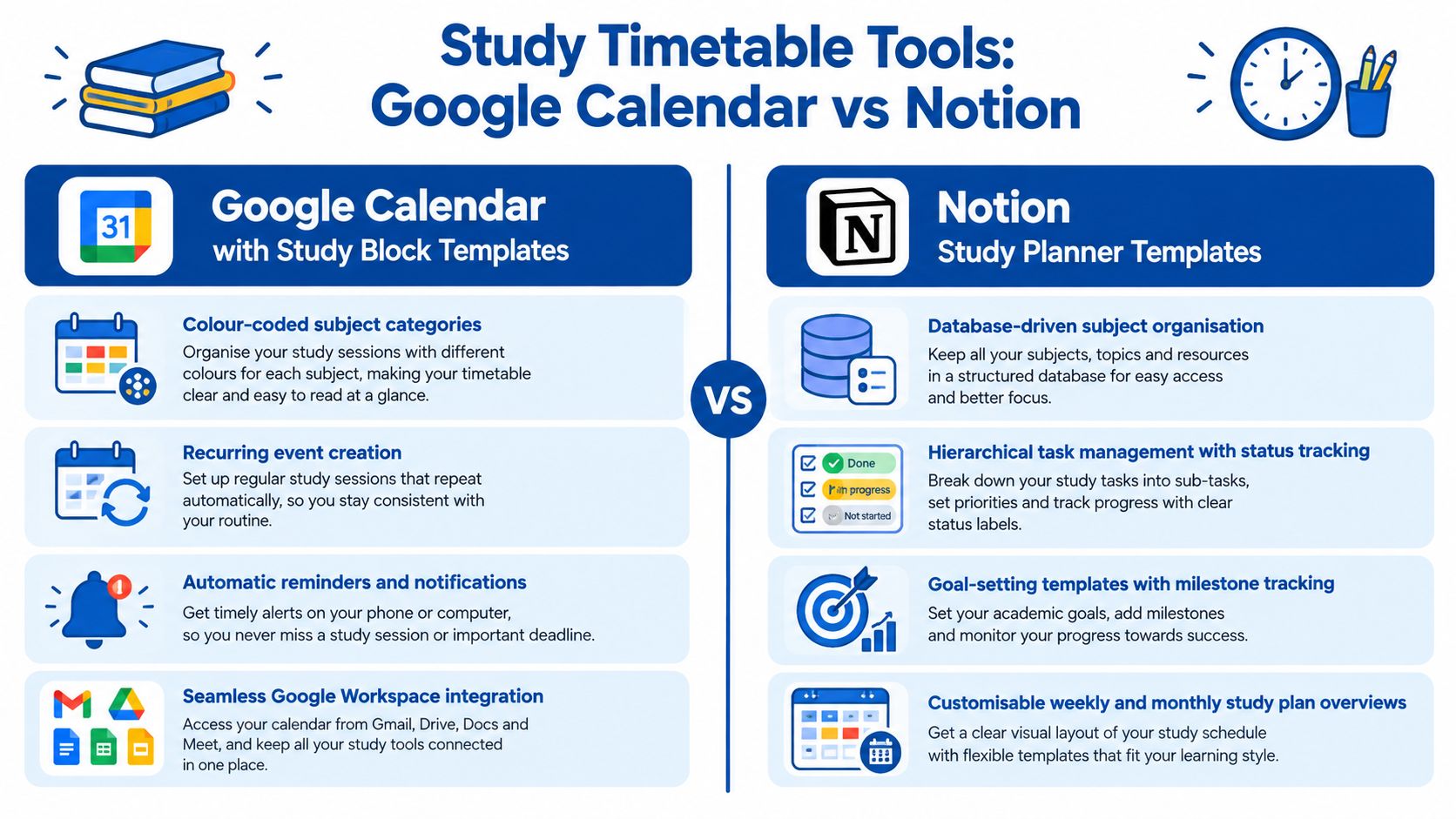
Google Calendar is the strongest starting point for students who need to see when studying will happen. It handles recurring blocks, reminders, colour coding, device synchronisation, and shared schedules without forcing students to build a complex database. A Class 11 student preparing for JEE or NEET can create separate calendars for mathematics, physics, chemistry, biology, schoolwork, and extracurricular commitments, then hide everything except the subject that needs attention.
The useful shift is to schedule study as a recurring appointment rather than as an empty intention. A mathematics block can recur on selected weekdays, while a science revision block changes as the exam date approaches. Students can also coordinate group revision sessions with classmates or share a timetable with a parent, teacher, or counsellor for accountability.
Practical rule: A calendar should show the next action, not just the subject. “Physics, electrostatics practice” is more useful than “Physics.”
Where the rhythm works
Calendar blocks work particularly well for students with several fixed commitments. A student can alternate focused work with short breaks, place reminders before an exam, and use a weekly review to move missed sessions instead of abandoning the entire plan. A schedule with Google Calendar blocks can remain simple enough to maintain during busy school weeks.
Students who need help deciding what belongs inside each block can connect assessed strengths and weak areas to Edvdo's subject test. The calendar then becomes the execution layer, while the assessment helps inform priorities.
Where it falls short
Google Calendar records time, but it doesn't prove that learning happened. It can show a completed block even when the student reread notes passively or stopped early. It also becomes cluttered when every assignment, topic, reminder, and resource is added as a separate event. For students who need detailed progress tracking, Calendar works better beside a learning dashboard than as the only system.
2. Notion Study Planner Templates
Notion suits students who want one workspace for subjects, notes, assignments, resources, and weekly reviews. An IB or CBSE student managing several subjects can connect a subject database to topic pages, assignment deadlines, revision status, and links to class material. A JEE or NEET aspirant can track chapters by status, then attach practice questions and error notes to the same record.
The flexibility is valuable, but it creates a risk. Students can spend more time designing a dashboard than studying. A polished template doesn't create a weekly rhythm unless every exam date leads to a set of dated topic blocks and a review habit.
A useful setup for heavy workloads
A practical Notion workspace can contain:
- Subjects database: List each subject, exam date, current confidence, and priority.
- Topics database: Connect chapters to subjects and assign a revision status.
- Weekly review page: Record missed sessions, completed topics, and the next week's adjustments.
- Session template: Pre-fill the goal, study method, practice task, and reflection prompt.
Students should begin with this small structure. Formula fields and linked databases can come later. The platform's broad collection of student learning and career resources can also sit beside study records when a student is connecting subject choices with longer-term plans.
Notion is especially useful when the student needs to answer, “What exactly should be studied next?” It can turn an exam date into a sequence of chapters, questions, and review tasks.
The limitation
Notion requires regular maintenance. A student who misses a week may find the system harder to repair than a simple calendar. It's also less effective for students who need an immediate visual timer or a quick task list. The tool works best for organised students who enjoy customising systems and will protect a weekly review session.
A short demonstration can help students decide whether the visual workspace matches their planning style.
3. Todoist Study Task Manager
A student opens Todoist on Tuesday night and sees three clear actions for chemistry, one timed paper for maths, and a reminder to review mistakes from yesterday. That is where Todoist helps most. It reduces the friction between “I have exams coming” and “I know what to do in the next hour.”
Todoist suits students who already know their subjects but keep dropping routine work. The app is strongest when exam dates are turned into repeating weekly actions. A board exam stays far away until it becomes Friday problem practice, Monday recall, and a short Sunday reset. The Today view keeps that rhythm visible. Recurring tasks help when revision needs to happen whether motivation is high or low.
The setup needs to stay plain. Start with each exam date, then work backwards into task types that match real study sessions: topic review, practice questions, error correction, and final revision. A task such as “study science” is too vague to protect a study block. “Cell division flashcards, then 10 textbook questions” gives the student a start point and an end point.
I would use Todoist for the student who misses work because everything feels equally urgent. Priority labels can separate this week's exam prep from lower-pressure homework. Shared projects can also help a study group divide past papers or revision topics, but only if each task has one owner and one deadline. Otherwise the list fills up and nobody feels responsible.
Task wording matters more here than students expect. Strong examples include:
- Review one difficult concept: Add the chapter name and the output, such as a short recall summary.
- Complete practice questions: Name the page range or question set.
- Correct errors: Record why the answer went wrong.
- Set tomorrow's first task: Leave a clear entry point for the next session.
Students who get stuck turning a weak topic into specific next steps can use Edvdo's AI chatbot beside Todoist.
Todoist starts to fall short when a student mistakes checked boxes for real learning. It tracks completion well, but it does not show whether the material was understood, remembered, or applied under pressure. It also rewards easy wins if the student is not careful. Use it to hold the weekly rhythm together, then test learning with active recall, timed practice, and feedback from teachers.
4. Microsoft OneNote Study Planner
OneNote suits the student whose study timetable keeps breaking because notes, worksheets, and revision prompts are scattered across different places. If exam dates are fixed but the weekly routine keeps slipping, putting the plan beside the actual material can reduce setup time. That matters most in note-heavy subjects, where the barrier is often finding the right explanation quickly enough to start.
Used well, OneNote turns a subject notebook into a working study system. A student can keep one notebook per subject, split sections by chapter or unit, and place a weekly planning page at the front of each section. The weekly page should not just hold dates. It should point to the exact page, diagram, or past-paper set for that session. For a medical entrance aspirant, that might mean one page with labelled anatomy diagrams, a short recall prompt, and a checkpoint for what to revisit later.
Search and tags help when a student remembers the topic but not where the explanation went. I find OneNote most useful for students who already annotate slides, handwrite working, or collect teacher comments, then need those materials to feed a repeatable week of revision rather than sit in folders untouched.
A setup that works in practice usually includes:
- A master calendar page: exam dates, deadlines, and when revision for each subject starts
- Subject sections: notes, worked examples, practice sets, and summaries
- Review tags: markers for weak areas, common errors, and pages that need another pass
Students who write by hand should file or scan notes soon after class, while the lesson still makes sense. Each study block then ends with retrieval or practice, not more note collection.
A student who wants subject notes to connect with future options can keep career prompts from the Edvdo dashboard for students exploring study paths on the same page as revision notes.
The trade-off is clear. OneNote stores material well, but it does not force a weekly rhythm on its own. Pages accumulate fast. If the student never reviews tags, schedules return sessions, or checks whether recall improved, the notebook becomes an archive instead of a timetable.
5. Trello Board Study Management System
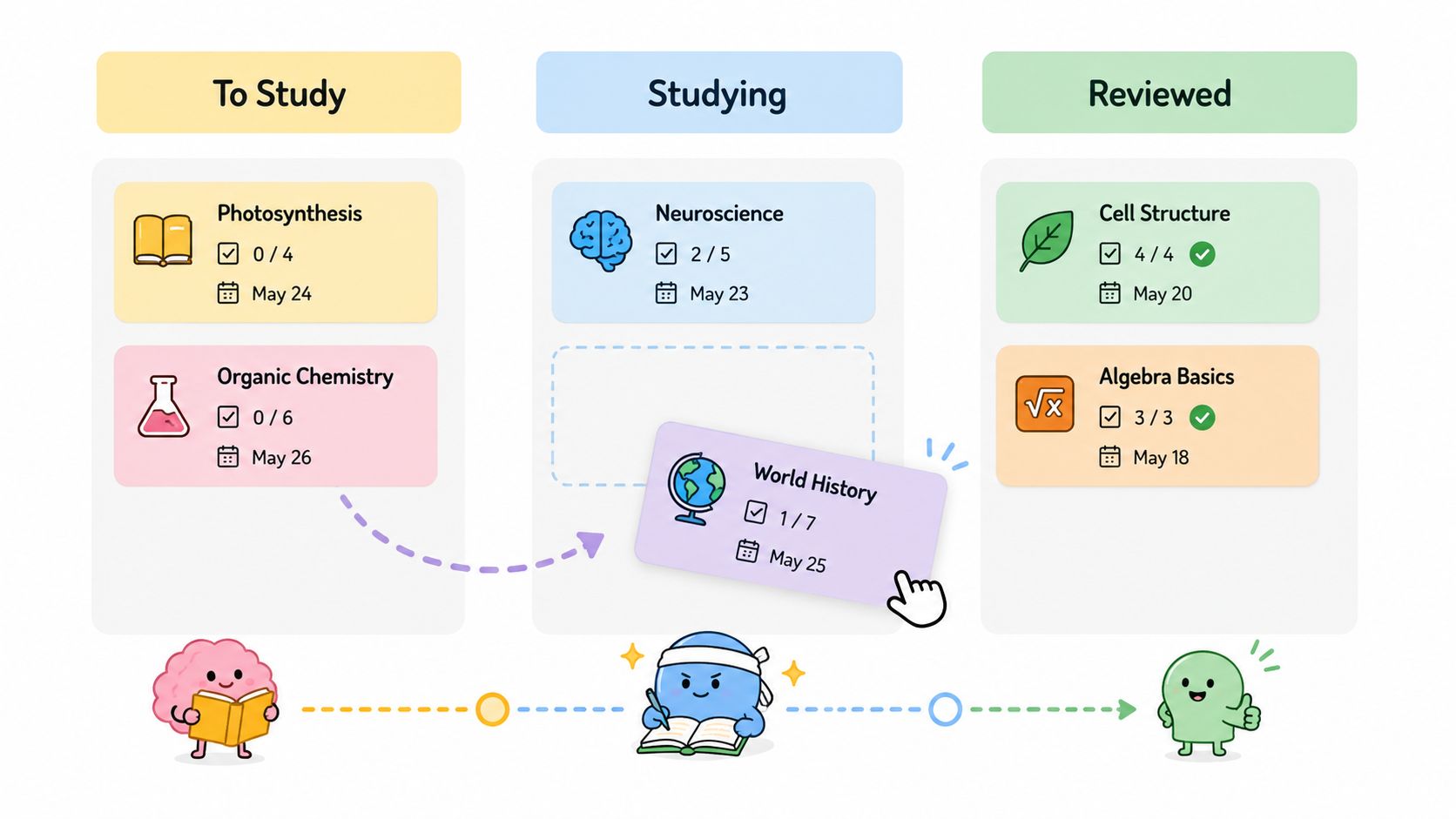
Trello makes progress visible by moving cards across lists. That structure suits students who think in stages rather than appointments. An exam preparation board might use To Study, Currently Studying, Revised, and Final Review. A card for “Chemical bonding” moves as the student learns the topic, completes practice, revisits mistakes, and prepares for the exam.
The visual workflow is especially useful for project-based learning. A group can organise a research assignment through Research, Writing, Editing, and Submitted. Each card can contain a checklist, due date, attachment, and assigned student. Everyone can see what is blocked and what needs attention.
Turning exam dates into movement
Trello works best when each card represents a meaningful learning unit. A card shouldn't say only “Prepare mathematics.” It might say “Revise quadratic equations and solve assigned problems,” with a checklist for concepts, examples, practice, and error correction.
Colour labels can separate subjects, while due dates distribute cards across the weeks before an exam. A calendar view helps expose overloaded days. Students can also add a weekly review card that asks:
- What moved to Revised: Identify completed learning units.
- What stayed blocked: Record the reason, such as missing notes or weak understanding.
- What moves next week: Select a small number of priority cards.
The limitation
Trello shows status better than it shows time spent. A student may move a card too early or leave a difficult topic in progress for weeks. The board can also become visually overwhelming when every small task receives a card. It works best for students managing multi-step topics, projects, or group work, but it should be paired with scheduled study blocks for daily execution.
6. Evernote Study Notes and Planning System
A student with tabs open for chemistry notes, a saved article on careers, two screenshots from class, and a voice memo from tuition has one main problem. The material exists, but it does not yet form a weekly study rhythm. Evernote suits that situation well.
It works best for students who gather study material from many places and need to retrieve it fast during a scheduled session. A Class 12 student exploring careers can keep articles, screenshots, notes, voice recordings, and web resources in searchable notebooks. An IIT or NEET aspirant can sort subject material by topic, then connect each note to the next study block and review point.
The useful setup is simple. Create notebooks by subject or purpose. Add tags for topic, difficulty, and review status. Then use one repeatable note format for every study session: topic, source, learning goal, unanswered questions, and next review date. That structure turns saved material into something you can reuse each week, especially when exam dates are getting closer and revision needs to become predictable.
One note matters more than students expect. Keep a weekly control note.
In that note, record what you studied, which topic slowed you down, which resource helped, and what needs to return to next week's timetable. Evernote is stronger here than in pure task handling. It helps students build a searchable learning record, so the next week is based on what happened, not on vague intention.
Tags should stay practical:
- Topic tag: Connect notes to chapters or concepts.
- Difficulty tag: Mark material by challenge level.
- Review tag: Flag notes that need retrieval practice.
- Strength area tag: Group material linked to assessed interests or capabilities.
Students can also save relevant Edvdo career information in a separate exploration notebook, then connect those ideas to subjects and possible pathways.
The trade-off is clear. Evernote stores knowledge better than it drives execution. Web clipping can turn into procrastination if every saved resource feels productive. Once a notebook becomes an archive without dated study blocks, the timetable weakens fast. Evernote works best for research-heavy students who already follow a weekly planning routine somewhere else.
7. Asana Project-Based Study Planner
A student with three exam dates, one coursework deadline, and a group presentation usually does not need another to-do list. They need a way to turn those fixed dates into a weekly rhythm that starts early enough. Asana suits that situation well.
It works best when study planning has real dependencies. For JEE or NEET preparation across a long stretch, a student can set up one project for the term, split it by subject, and map which topics must be finished before mock tests or harder chapters. For group assignments, the value is different. One person drafts, another reviews, and everyone can see what is blocking the next step.
The timeline matters because it shows pressure before the week collapses. Exam dates, submission deadlines, and prep tasks can sit in the same view. If two heavy subjects crowd the same week, the student can pull reading, note-making, or first-pass practice forward instead of discovering the clash too late.
Asana gets stronger when each task carries decision-making details, not just a title. Useful fields include Subject, Difficulty, Time required, Prerequisite, and Milestone. That setup helps students build a repeatable weekly review. They can sort for hard tasks that need fresh energy, check which prerequisites are still incomplete, and rebuild the coming week around what the exam sequence demands.
One rule makes Asana practical. Every exam milestone should connect to weekly actions such as topic coverage, practice sets, error review, and final revision. Otherwise the timeline looks organised while the study rhythm stays vague.
There is a trade-off. Asana can become too heavy for a student who only needs a simple daily timetable and a short task list. Dependencies, fields, and timeline edits take maintenance. It is strongest for long preparation cycles, multi-step academic work, and shared projects. It starts to fall short when the workload is small and the planning overhead becomes its own distraction.
8. Pomofocus and Focus-Based Study Scheduling Apps
A common exam week problem looks like this. The student has a revision list, knows the next paper is close, sits down at 7 p.m., and still loses the first 30 minutes to avoidance. Pomofocus, Forest, Focus Keeper, and Be Focused are useful in that moment. They turn "start revision" into one clear action, with a visible finish line.
That makes them different from calendar or project tools. Their job is not to map the whole semester. Their job is to help a student begin on time often enough that exam prep becomes a weekly rhythm instead of a last-minute push.
“A timer can start the session. It can't decide whether the session produced understanding.”
Used well, a focus app supports a repeatable pattern. Monday might hold two short history recall sessions after school. Wednesday might need one longer block for chemistry problems, because stopping every few minutes breaks the thinking. The timer should fit the task and the student's attention level, not force every subject into the same interval.
This is why these apps work best for students rebuilding consistency, dealing with procrastination, or finding it hard to re-enter study after a break from routine. Forest suits students who respond to visual reinforcement. Pomofocus and similar apps suit students who want cleaner session tracking, simple controls, and a quick way to log what happened.
The weak point appears fast if the timer becomes the whole system. Time spent is easy to count. Learning is harder. A student can finish several focused intervals and still do little beyond passive rereading. For exam preparation, each session needs a clear academic target and a next step that feeds the coming week.
A useful record is short:
- Subject and topic: State exactly what the session covered.
- Learning action: Note whether the work was recall, problem solving, summarising, or teaching aloud.
- Result: Mark what was finished and what still caused difficulty.
- Next start point: Write the first step for the next session.
Students should place these sessions inside existing study blocks and use learning-pattern insights from Edvdo when setting priorities. That is where focus apps hold up. They help students start. They start to fall short when the actual need is planning backward from exam dates across multiple subjects.
8-Tool Comparison: Study Timetable Apps & Features
| Tool | Core features / characteristics | Quality ★ | Best for 👥 | Price 💰 | Unique strength ✨🏆 |
|---|---|---|---|---|---|
| Google Calendar (Study Blocks) | Color-coded study blocks, recurring events, reminders, shareable, attachments | ★★★★ | 👥 Students scheduling time & group study | 💰 Free | ✨ Seamless Google Workspace sync, 🏆 Best for simple time‑blocking |
| Notion (Study Planner) | Databases, templates, calendar/timeline views, linked notes | ★★★★ | 👥 Students building custom study systems & trackers | 💰 Freemium (robust free tier) | ✨ Highly customisable database relations, 🏆 Best for all‑in‑one planner |
| Todoist (Study Task Manager) | Tasks/subtasks, priorities, recurring templates, analytics, gamification | ★★★★ | 👥 Task‑oriented students wanting quick capture & streaks | 💰 Freemium (premium for advanced filters/analytics) | ✨ Gamified streaks + productivity reports, 🏆 Best for consistent task habits |
| Microsoft OneNote (Study Planner) | Notebooks → sections → pages, planner templates, Office Lens, search/OCR | ★★★★ | 👥 Note‑centric students & schools using Microsoft ecosystem | 💰 Free (with Microsoft account) | ✨ Superior note capture & OCR, 🏆 Best for lecture notes + revision |
| Trello (Kanban Study Boards) | Kanban boards, cards/checklists, labels, calendar view, Power‑Ups | ★★★★ | 👥 Project‑based learners & group projects | 💰 Freemium (Power‑Ups on paid plans) | ✨ Visual workflow & drag‑drop progress, 🏆 Best for visual project tracking |
| Evernote (Notes & Planning) | Multi‑format notes, web clipper, tags, powerful search, OCR | ★★★ | 👥 Research‑heavy students and resource collectors | 💰 Freemium (limited free tier; Premium paid) | ✨ Web Clipper + searchable archives, 🏆 Best for long‑term resource storage |
| Asana (Project‑based Planner) | List/board/timeline (Gantt), dependencies, custom fields, workload view | ★★★★ | 👥 Students planning semester timelines & dependencies | 💰 Freemium (limits on advanced automation) | ✨ Timeline & dependency mapping, 🏆 Best for semester/complex planning |
| Pomofocus & Focus Apps (Pomodoro) | Custom timers, session history, simple UI, basic stats, gamification | ★★★★ | 👥 Students needing focus structure or ADHD support | 💰 Free core; premium options | ✨ Pomodoro timers + focus stats, 🏆 Best for boosting concentration and starting sessions |
Choose One Tool and Test It for Two Weeks
The best tool is the one that matches the student's main constraint. Choose Google Calendar when shared schedules and fixed commitments cause problems. Choose Notion or OneNote when notes and topic organisation matter most. Choose Todoist when assignments disappear into a long list. Choose Trello or Asana when projects and multi-stage preparation need visible movement. Choose Evernote when resources are scattered. Choose Pomofocus when starting and sustaining attention are the main barriers.
A timetable should begin with exam dates, not with app features. Work backward from each exam and identify the topics that need learning, practice, correction, and review. Then assign one realistic subject block to each available study day. Indian students often need to plan around classes, commuting, rest, and other obligations. Research on Indian college and university students found that 73.21% ordinarily spent 6–8 hours attending college or an institute, so a timetable that treats the full day as available study time will usually fail (Indian study-time research).
A two-week trial should answer practical questions:
- Did the student start planned sessions: Count whether the timetable led to action.
- Did priority topics move forward: Check completed learning tasks, not just logged hours.
- Did missed work get rescheduled: See whether the system survives interruptions.
- Did the weekly review change the next plan: Adjust workload using real completion data.
- Did the student protect recovery time: Keep meals, sleep, leisure, and breaks visible.
A timetable isn't successful because it looks organised. It succeeds when a student can follow it during an ordinary week and adapt it before an examination period becomes overwhelming. Research on Indian children found that study-related activities outside school occupied meaningful daily time, while play also formed part of their routine. The evidence supports distributing work across repeatable blocks instead of filling nearly all waking time with academic tasks (research on Indian children's daily activities).
Students should add a second tool only when the first leaves a clear gap. A calendar plus a focus timer may be enough for one learner. A note system plus a task manager may suit another. Adding more platforms too early creates duplicate reminders and maintenance work.
Edvdo can help students set priorities before building the timetable by connecting assessments, learning patterns, guided activities, career exploration, and progress tracking. Its Career Hub also includes a timetable builder for schedule planning. Students should choose one system, run the trial, review the evidence each Sunday, and keep only the tools that make the next study session clearer.
Edvdo helps students understand their strengths, motivations, and learning patterns through assessments, guided activities, reports, and its Vedu AI mentor. Students can use those insights to set better subject priorities before building a repeatable timetable, so visit Edvdo and explore a planning approach that connects study decisions with longer-term academic and career choices.